
Verde Casino Mobile App for Tablet Enthusiasts in Hungary
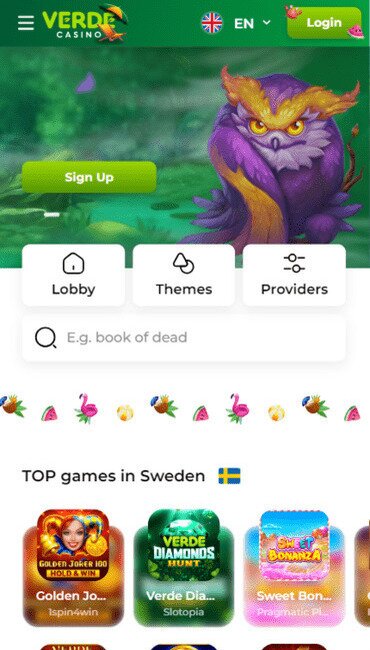
This page explains how the böngéssze az oldalt tablet app operates, how to download it, and what to anticipate from the mobile experience on a wider touchscreen. We concentrate on practical details for tablet users in Hungary: compatible devices, installation paths, in-app navigation, data usage, and the main differences from the desktop site. We also respond to common installation and account questions so you can decide whether the tablet route suits your routine.
What exactly the Verde Casino Tablet App Delivers
We view the Verde Casino app as a specialized casino interface instead of a scaled-down desktop page. On a tablet, the lobby, game tiles, cashier, and account menus are organized for touch input, so you press rather than hunt for small links. The result is a session that appears closer to a native app when you add it to your home screen, while still using your existing Verde Casino account and balance.
The tablet view preserves the core journey clear: sign in, browse categories, open a game, manage limits, and return to the lobby without losing track of context. We structure the route around short sessions as well as longer play, which is important when you hold a tablet in portrait mode or change to landscape. Account state, favourites, and recent activity should be consistent across devices when you sign in.
We also employ the tablet page to surface practical controls that are easy to miss on smaller phones. Balance and cashier shortcuts sit within reach, game search is highlighted, and responsible-gaming settings are accessible from the account area. If you like a larger screen but do not desire a laptop, the tablet app is the middle option: more space than a phone, less setup than a desktop.

- Single sign-in for lobby, cashier, and account settings.
- Touch-based game categories and search filters.
- Rapid access to deposits, withdrawals, and transaction history.
- Promotions and bonus details in the account area.
- Responsible-gaming controls and session reminders.
Ways to Download and Install Verde Casino on a Tablet
We split installation into two paths: the browser-based home-screen app and the official installable package where we provide one. Both routes use your Verde Casino account, so you do not have a second registration. The exact labels vary with Android and iPadOS versions, but the sequence is steady. Always start from the official app page rather than a search result or forwarded link.
Adding on Android tablets
On Android, launch the official Verde Casino app page in Chrome, examine the install option shown, and obey the prompt to install or add to the home screen. If we supply an APK, download it only from that page, activate installation from the browser or file manager you used, and disable that permission after installation. Keep Play Protect enabled and steer clear of third-party APK mirrors, because casino-branded packages are a common target for modified files.
- Launch the official Verde Casino app page in a current browser.
- Pick the install or add-to-home-screen option shown for your device.
- If an APK is offered, download it from the same official page.
- Allow installs from that source only when prompted, then complete installation.
- Access the app, sign in, and check the cashier and game lobby load.
- Turn off the unknown-source permission after installation.
Setting up on iPad
On iPad, open the official page in Safari, tap the share icon, and choose Add to Home Screen. Name the shortcut Verde Casino and confirm. The icon then opens in a standalone window that feels like an app and keeps you signed in according to your browser settings. If a native iOS app is available in your region, use the App Store link from the official page instead of searching for a similar name.
Side-loading and official packages
Side-loading refers to loading a package beyond the normal app store. We exclusively recommend that route when the package originates directly from Verde Casino and the page clarifies the needed permissions. Do not install an APK from a forum, file locker, or messaging group, even if it carries our name and logo. Before installing manually, review bbc.co.uk the package source, your device security settings, and if a browser-based shortcut would satisfy your needs with less risk.
After installing, launch the app once on Wi-Fi, sign in, and try the cashier before you deposit. This first run allows the app cache its interface and ensures that your tablet can manage the lobby. If the app does not to open, clear the cache, set up again from the official source, or utilize the browser version. We prefer a working browser session over a broken installation.
Device Compatibility and Technical Requirements
Compatibility depends on the tablet, operating system, browser, and the setup path we provide in your region. We never expect you to speculate: the official app page of Verde Casino is the source for current minimum versions and supported packages. As a practical rule, a tablet acquired in the recent years and maintained with updates will offer you the smoothest experience.
Android tablets
On Android tablets, we suggest a up-to-date Chrome browser or an official installable package where one is offered. Android gives you more install flexibility, but that also signifies you should stick to links from Verde Casino. If your tablet uses an legacy Android version, the page may still load, but animations, live dealer streams, and cashier screens can become slow. Consult the official page for the latest minimum before installing.
iPad and iPadOS
On iPad, the standard approach is Safari or another modern browser, with an optional home screen shortcut that acts like an app. iPadOS updates matter because security changes and browser engine updates affect payments and live games. We advise keeping iPadOS current and enabling Safari to save site data if you prefer quicker returns. If a official iOS app is available for your region, only install it from the verified App Store listing linked by Verde Casino.
What to check before installing
Before you set up or set up a shortcut, verify four things: free storage, a reliable connection, the right regional page, and your account verification state. Storage counts because cached game files and browser data accumulate. A reliable connection matters more for live casino than for slots. Verification counts because the cashier can place restrictions on deposits or withdrawals until verification is finished. We outline these checks because most setup problems are configuration issues, not app defects.
- Up-to-date Android or iPadOS version with browser updates applied.
- At least a few hundred megabytes of available storage for cache and updates.
- Wi-Fi or a dependable mobile connection for live dealer tables.
- Account details and location that match your validated profile.
- Verde Casino’s official link for the app or home-screen shortcut.
Key In-App Features and Menu Structure
We build the tablet app around navigation that remains readable at arm’s length. The lobby features category tiles, search, and filters rather than a long list of text links. That matters on a tablet because you often hold the device in one hand or rest it on a stand. The aim remains to reduce taps between sign-in and the game you want, while keeping cashier and safety controls easy to reach.
Finding games quickly
Search is the fastest route when you know the title, but filters aid when you are browsing. You can filter by game type, provider, or featured sections where available, then return to the same category without starting over. Favourites come in handy on a shared tablet because they eliminate repeat searches. We recommend using the search field first and the category tiles second, especially on slower connections where large image grids take longer to load.
Overseeing account and payments
The account area brings together profile details, verification status, payment methods, transaction history, and responsible-gaming settings. On a tablet, the cashier benefits from the larger screen because you can examine limits and pending transactions without zooming. We maintain deposit and withdrawal routes inside the signed-in area, so you should never input payment details on a page that opened from an unsolicited link. Check the cashier for the methods available in your region.
- Lookup and category filters for a large game library.
- Favourites that cut repeat navigation.
- A cashier view with transaction history and limits.
- Promotions tied to your account rather than generic banners.
- Responsible-gaming controls and session reminders.
- Notification settings you can adjust per device.
Navigation also affects safety. We put sign-out, account verification, and responsible-gaming tools inside the same menu structure, so you can locate them without hunting through promotional pages. If you use together a tablet, sign out after each session and avoid saving payment details in the browser. These habits count more on a tablet than on a personal phone because tablets are often shared between family members or left on a coffee table.
Efficiency, Bandwidth Usage, and Battery Life
Tablet performance varies with the game type. Slots and lobby browsing are relatively light, while live dealer tables use live video and therefore higher data and battery consumption. We suggest testing the app on Wi-Fi before relying on mobile data. If your tablet heats up or the video lags, decrease the stream quality where the table offers it, quit background apps, and go closer to your router.
Bandwidth usage on tablet connections
Data use is not constant because live streams, game graphics, and update sizes change. A short slots session may use a limited amount, while an hour of live dealer video can take significantly more. On a metered connection, monitor your usage in the device settings and prefer Wi-Fi for long sessions. We do not provide a single data figure because it would be misleading across game types and stream qualities.
Ensuring stable performance
Stable performance stems from routine maintenance rather than constant reinstalling. Maintain the browser or app updated, empty cache when the lobby appears outdated, and maintain enough free storage for temporary files. Close unused tabs and background apps before live dealer sessions. If the app hangs during a payment, do not retry repeatedly; review transaction history first, then get in touch with support with the time and reference if the status is ambiguous.
- Utilize Wi-Fi for live casino and long sessions.
- Maintain at least a few hundred megabytes of free storage.
- Update the app or browser before reporting a display bug.
- Clear cache after major updates if tiles do not load.
- Shut background apps when video freezes.
- Check transaction history before repeating a payment.
Mobile App vs Desktop Platform and Practical Limits
The mobile app and desktop site have the same profile, funds, and game collection, but they fit different routines. A tablet excels on portability and touch interface; a desktop excels on multi-window use, keyboard typing, and a fixed large screen. We do not consider one as a substitute for the other. The right choice relies on whether you value quick access from a sofa or a full workstation for lengthy sessions.
Where the tablet application is better
The tablet application is more suitable for brief, regular sessions: checking a go-to game, making a deposit, or reviewing a bonus. It starts faster than a laptop, operates in vertical or horizontal mode, and sits on a holder beside a chair. Touchscreen controls also make browsing categories more direct than a mouse for some users. If you travel with a tablet and stable Wi-Fi, the app preserves your account access nearby without bringing additional hardware.
Situations where the desktop version still excels
The desktop version still shines when you need many windows, thorough transaction checking, or a physical keyboard for lengthy forms. Identity checks and customer service chats can be easier on a large fixed screen. Some users also favor a wired internet for live dealer tables. We maintain the desktop version accessible for those scenarios, and your account changes should show up on the tablet after you re-login or update the page.
Limits to plan for
Account for boundaries rather than presuming the tablet app bypasses them. Regional rules can influence account creation, deposits, and game selection. Identity checks can delay payouts. Live dealer tables may have different data and energy needs. A multi-user tablet needs careful logout habits. We also cannot ensure every title will appear the same on every outdated device, so test the cashier and a go-to game before starting a extended session.
- Instant touch access to lobby, payment area, and account options.
- A portable session on wireless internet without a portable computer.
- Vertical or horizontal use on a stand.
- Notifications and home screen shortcut where available.
- A cleaner interface than a standard desktop browser.
Common Questions
Do I need a separate Verde Casino account to use the tablet app?
Absolutely not. We use one Verde Casino account on the tablet app, the mobile browser, and the desktop site. Access with the same credentials, and your balance, verification status, transaction history, and responsible-gaming settings are synced. Should you add the app to your home screen, it still opens your existing account instead of creating a new profile. Get in touch with support if you have trouble accessing after installation.
What tablets can operate the Verde Casino app?
Most modern Android tablets and iPads support the browser-based app or an official package if offered. We don’t list a single fixed cutoff in this article because minimum versions can change; consult the official Verde Casino app page for the current requirement. Older tablets could load the lobby but struggle with live dealer video. Keep your operating system and browser updated for the best result.
How can I install Verde Casino on an iPad?
Launch the official Verde Casino app page in Safari, press the share icon, and pick Add to Home Screen. Name the https://www.coindesk.com/markets/2024/07/02/kamala-harris-odds-of-winning-democratic-nomination-surge-on-polymarket/ shortcut and confirm. The icon then opens a standalone window that behaves like an app while using your existing account. Should we offer a native iOS app for your region, use the App Store link from the official page. Avoid searching for similar names in the App Store.
Is it safe to sideload an APK safe for Verde Casino?
Side-loading is only permitted when the APK comes straight from Verde Casino and the official page describes the permissions. We do not endorse packages from forums, file lockers, or messaging groups, because modified casino files can take credentials. If you side-load, enable unknown sources only for that setup, finish the install, then deactivate the permission. A browser-based home-screen shortcut is usually the safer option.

Will the tablet app require more data than the desktop site?
It may, especially during live dealer sessions, because video streaming requires more data than text-heavy lobby pages. Slots and account screens are less demanding. The device and stream quality also influence usage. We suggest Wi-Fi for long sessions and checking data in your tablet settings if you are on a metered connection. There is no single figure that matches every game type.
May I use the tablet app if I am in Hungary?
You may use the tablet route where Verde Casino accepts players from your location and your account is verified. Local rules can influence registration, payment methods, and game availability, so check the official page and cashier for the options displayed to you. The installation steps are the similar as elsewhere, but eligibility and limits vary by your region. Reach support if your location status is unclear.